With just a list of estimates and priorities and automatic scheduling will instantly calculate the most efficient order at any given point in time. Create flexible agendas by adding deadlines, scheduling constraints, and other options. Like a GPS it will instantly recalculate after any estimate overruns, interruptions, distractions, appointment reschedulings, changing priorities, and more. Stay focused on the current task with the confidence that should any task with constraints become at risk at not getting finished in time, Watership Planner will let you know.
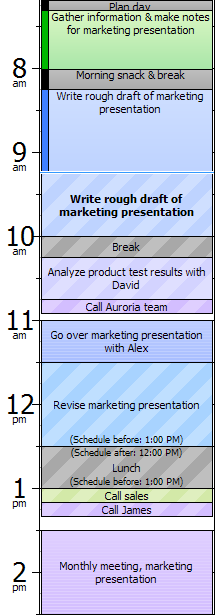
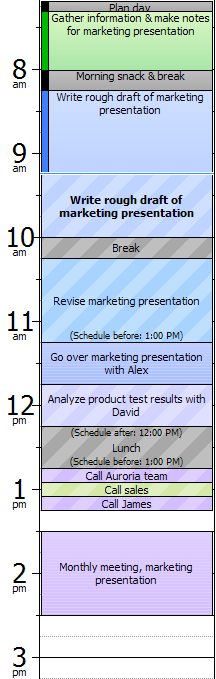
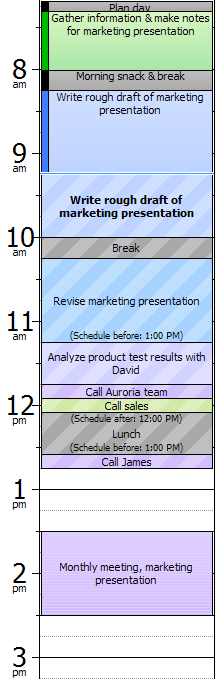
Here we have an example of a day that began shortly after 7am and it is currently 9:14am. We have already have already tracked and completed 3 tasks and are currently still working on "Write rough draft of marketing presentation."
Below the example are some scenarios that can happen at 9:14am and how the automatic scheduler would rearrange the tasks. |
| |
 |
| Legend |
 |
Tracked Time
A record of what you did |
 |
Todo
When given an estimate todos are automatically scheduled, they move around depending what is happening around them |
 |
Appointment
These can't be moved |
 |
Current time
Everything above this line are tracked times, or what actually happened in the past. Everything below this line is automatically scheduled, a projection of what is expected to happen |
 |
Current task
The todo after the current time line is the current task you are working on, it has a bold font |
 |
Constraints
Automatically scheduled tasks can have constrainte. |
 |
Gaps
Places where the automatic scheduler couldn't fill them with task small enough to fit. You can designate tasks as splittable or that can be broken up, like "Respond to E-mail" perfect for doing during these gaps |
| |
|
|
| |
|
|
| |
|
|
Scenario
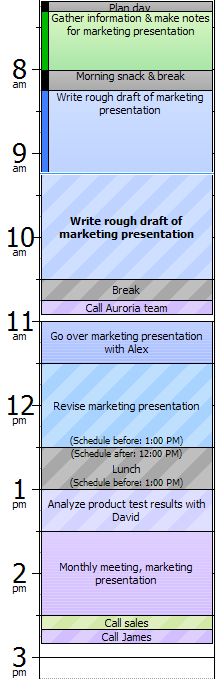
This report is going to take half an hour longer than I expected
|
Scenario
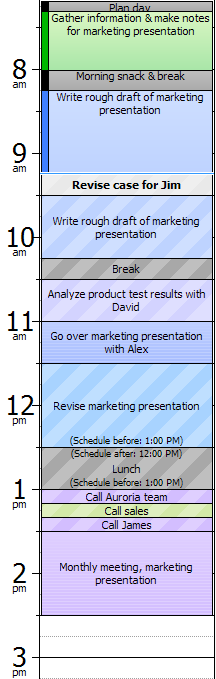
You get a call asking to handle a new case |
Scenario
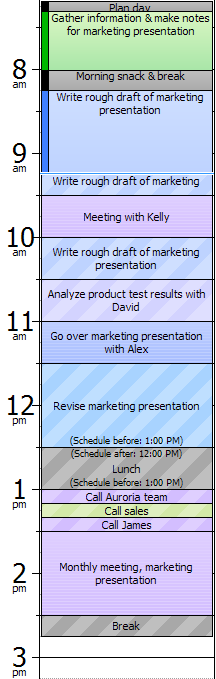
Your manager needs to meet with you in 15 minutes |
Action
Increase the estimate of the current task by 30m
|
Action
Add an interruption with an estimate of 20m |
Action
I increase the estimate of the current task by 30m |
Result
You will have to meet with David after lunch
|
Result
You won't have time to call the Auroria team until after lunch |
Result
Heads up, you've lost your gap buffers and your break got bumped. It's time to get serious |
| |
|
|
 |
 |
 |
| |
|
|
Scenario
This report was easier than expected, what's next?
|
Scenario
Alex is going to end up 15 minutes late, now what do I do with this open gap?
|
Scenario
Alex called to cancel, now what? |
Action
Set the current task as completed
|
Action
Move the meeting with Alex up 15 minutes
|
Action
Cancel the meeting with Alex
|
Result
Nice, you should get all your calls done before lunch and you have a clean hour before the monthly meeting |
Result
You should now have time to revise the marketing presentation after finishing the rough draft and taking a break before Alex gets there |
Result
You will get most of your calls finished before lunch and have a 45 minute buffer before the monthly meeting |
| |
|
|
 |
 |
 |
| |
|
|
Imagine how much more of a handle you will have with your time when you can instantly visualize how different scenarios impact your schedule.
Learn more... |

